 Areca Docs
Installation and setup
Install the site SDK, run areca init, and set the environment variables that connect your website to its Areca site.
This guide connects a website project to an existing Areca site. You need the site's key and site token from the CMS, and a package.json at the root of the website project.
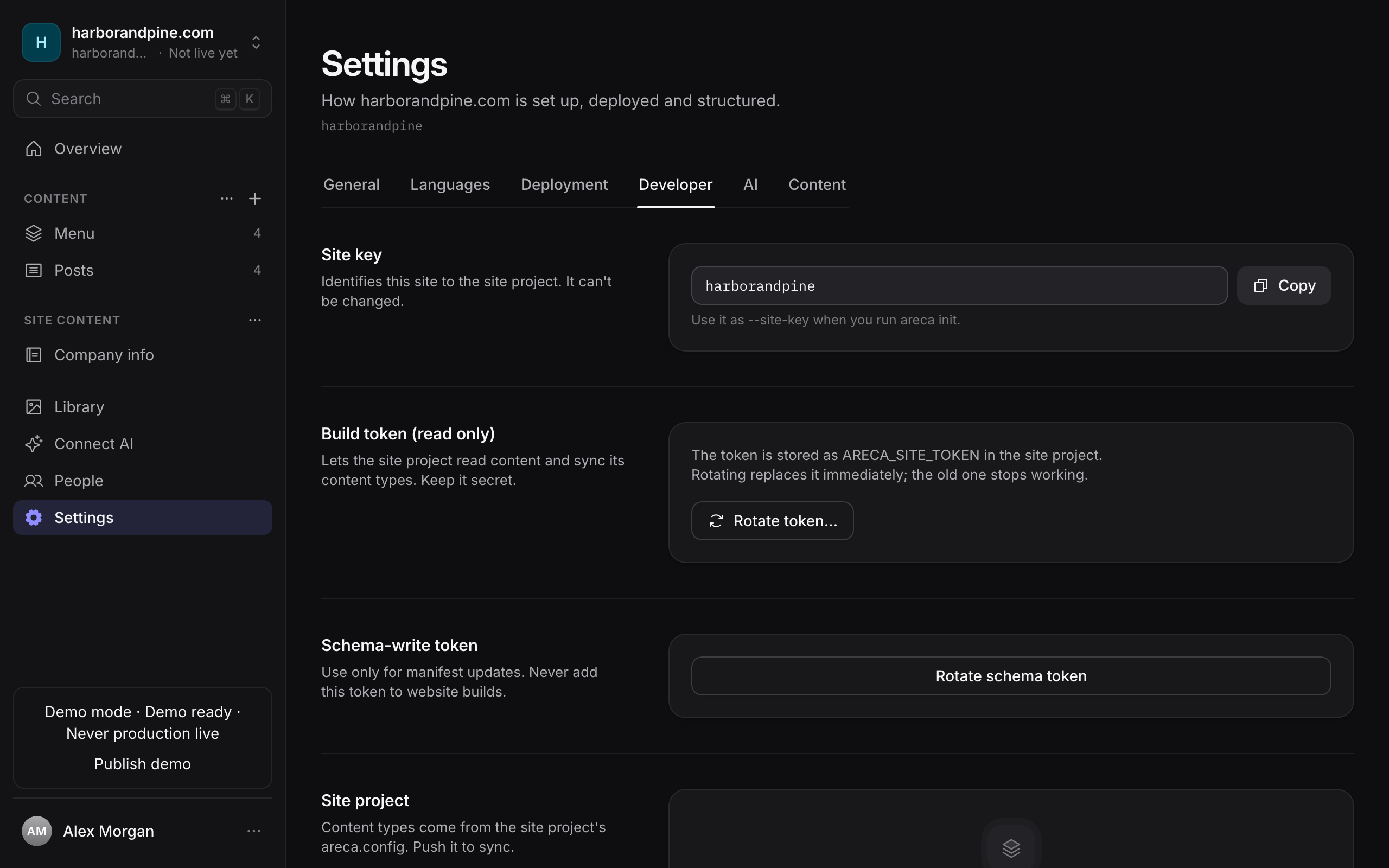
Get the site token from the CMS. Open the site's Settings and go to the Developer tab. The token is shown when the site is created or when you rotate it, and it is shown only once. If you lose it, rotate it from the same tab.
Install the package.
pnpm add @areca-cms/site-sdkRun areca init. The command asks for three values and writes the files described below.
pnpm exec areca initEnter the values when prompted:
- CMS URL: the address of your CMS, such as
https://cms.example.com. The prompt suggestshttp://localhost:3000for local development. - Site token: the token from the Developer tab. The prompt hides what you type.
- Site key: the lowercase key shown on the Developer tab, such as
acme-site. Use letters, numbers and hyphens.
Add the schema token. Init does not write it. On the Developer tab, find the Schema-write token section. Add the token to .env.local as ARECA_SCHEMA_TOKEN=. Only the schema push needs it.
Define your content. Add your collections to areca.config.ts, then push them with areca manifest push. See Defining your content and Syncing the schema.
Non-interactive setup
For scripted setup, pass all three values as flags and add --yes to skip the prompts. If a value is missing, init stops with an error that names it.
pnpm exec areca init \
  --cms-url https://cms.example.com \
  --token "$ARECA_SITE_TOKEN" \
  --site-key acme-site \
  --yes
The --token flag puts the token in your shell history and the process list. On a developer machine, prefer the interactive prompt.
What areca init writes
Init creates or updates these files in the website project:
| File | What it contains |
|---|---|
areca.config.ts | A defineSiteContent call with your site key and an empty collections object. Existing files are not overwritten unless you pass --force. |
.env.example | ARECA_CMS_URL, ARECA_SITE_TOKEN and ARECA_SCHEMA_TOKEN with empty token values. It contains no secrets, so you can commit it as a template. Existing files are not overwritten unless you pass --force. |
.env.local | ARECA_CMS_URL and ARECA_SITE_TOKEN. Existing lines for these keys are updated, and other lines are kept. |
.gitignore | Adds .env.local, and ignores the generated content directory's pulled files (src/generated/content/*) while keeping src/generated/content/areca.gen.ts tracked. |
src/generated/content/manifest.json | An empty placeholder manifest. Run areca pull to replace it with published content. |
package.json | Adds a sync-manifest script (areca manifest push) and a content:pull script (areca pull), unless those scripts already exist. If you have a dev script that does not load env files, init wraps it in areca run --. |
Init does not add .env to .gitignore. Add it yourself if you keep secrets there.
The --out and --config flags change the generated directory and the config path. The defaults are src/generated/content and areca.config.ts.
Init does not create areca.gen.ts. The first areca pull writes it. Commit it once it exists. If your .gitignore already lists the whole content directory from an older version of Areca, such as src/generated/content/, change that line to src/generated/content/* and add !src/generated/content/areca.gen.ts. Otherwise the types file stays out of Git.
Environment variables
The CLI reads these variables from the environment. It also loads .env.local, then .env, from the directory where you run it. Values already set in the environment take precedence over both files.
| Variable | Used by | Notes |
|---|---|---|
ARECA_CMS_URL | Every command and every client | The CMS base URL. Trailing slashes are removed. |
ARECA_SITE_TOKEN | areca pull, areca manifest pull, areca manifest push, and the SDK client | The read token. The client needs it to start, so areca manifest push also needs it. |
ARECA_SCHEMA_TOKEN | areca manifest push, areca sync-manifest and syncManifest() | The schema-write token. Use it only where you push the schema. |
ARECA_SITE_KEY | areca manifest pull | Used only when your config file does not exist yet, so the command can write one. |
The SDK reads process.env directly. It does not load .env files on its own. If your framework's dev server or build needs these values, load the env files first. If your dev script does not already load them, areca init wraps it in areca run --. See running commands with env files for how areca run works.
The env file parser is simple. Write plain KEY=value lines. It does not support an export prefix or inline comments, and it strips matching quotes around a value. An empty value in .env.local also blocks the same key from .env, because the variable is then set to an empty string.
Keep tokens on the server
The site token and the schema token are secrets.
- Never expose them to the browser. Do not give them a public prefix such as
VITE_orNEXT_PUBLIC_, because those prefixes put the value in the browser bundle. - Keep
.env.localout of Git. Init adds it to.gitignore. Check that it stays there. - Keep the schema token in the authoring environment only. Builds and content pulls need the site token. Only the step that pushes the schema needs the schema token.
Protect the schema token
The schema token can replace your site's content model. A push disables any collection you leave out of the config. Store it like a deploy key, and never add it to website build settings.
Restrict the file permissions
Init writes .env.local with your system's default file permissions. On macOS and Linux, other users on the same machine may be able to read it. Restrict it to your own user after init:
chmod 600 .env.localRun the same command on any other env file that holds a token.
Rotating tokens
You can rotate either token from the site's Settings, on the Developer tab:
- Site token: use Rotate token…. The old token stops working immediately. Any build or pull that still uses it fails until you update
ARECA_SITE_TOKEN. - Schema token: use Rotate schema token. Update
ARECA_SCHEMA_TOKENin your authoring environment afterwards.
Next steps
- Defining your content: write the collections and fields for your site.
- Syncing the schema: push the content model to the CMS.
- Pulling content at build time: download published content before the build runs.